View Controls
View Controls are the orientation and camera controls used to inspect the model from different directions while working in the Modeling Area.
What You Can Do
- Reorient the view while inspecting parts and assemblies
- Use orientation controls and gizmos to understand model direction
- Switch focus between different viewing angles while preparing selections and edits
- Combine camera movement with Scene interaction for point-and-click workflows
Why They Matter
- They make it easier to understand model orientation before selecting geometry
- They help you inspect features from standard and angled views
- They reduce selection mistakes when working on complex geometry
Gizmo Types
Zoo Design Studio supports more than one orientation gizmo style in the Modeling Area. The selected style changes how the view-direction control looks, but not the underlying camera behavior.
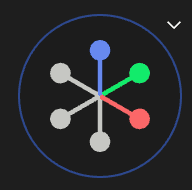
Axis Gizmo
The Axis gizmo shows the model orientation as labeled axes. This style is compact and works well
when you want a lightweight directional reference while keeping the scene unobstructed.
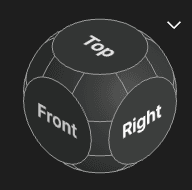
Cube Gizmo
The Cube gizmo shows orientation as a clickable cube. This style makes it easier to think in
named standard views such as top, bottom, front, back, left, and right.
Related Settings
Some view behavior is configured from user settings, especially:
- camera projection
- camera orbit
- gizmo type
- mouse controls
See User Settings > Modeling for those preferences.