File Explorer
The File Explorer shows the files and folders inside the current project.
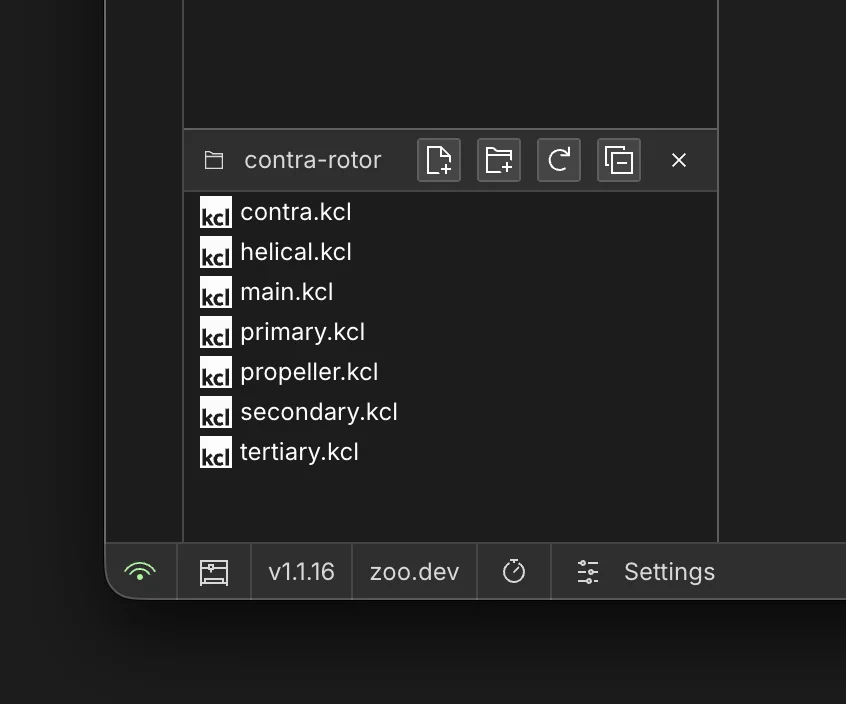
What You Can Do
- Browse project folders and files.
- Create files and folders.
- Rename files and folders.
- Copy, paste, and drag entries within the project.
- Archive entries you no longer need.
- Add files from your computer by dragging them into Project Files in the browser or desktop app.
- Open
.kclfiles directly for editing. - Reveal the project, or an individual file or folder, in the system file manager on desktop.
Reveal in the System File Manager
Use Reveal in file explorer when you need to work with a project in Finder, File Explorer, or your
platform's file manager.
To reveal the entire project, open the project menu from the project name in the Top Bar and select
Reveal in file explorer. To reveal one item, right-click a file or folder in Project Files and
select Reveal in file explorer.
This option is available only in the desktop app. It is hidden in the browser because browser projects do not expose the same local filesystem paths.
What You Cannot Do
- Open non-KCL files as editable KCL documents.
- Keep sketch mode active while switching files when the app needs to cancel it first.
Key Differences in This Area
- Project filesystem operations are built directly into the workspace.
- Switching files can cancel sketch mode so the modeling state stays consistent.