Hello! The year is nearly over, but the Zoo team is still hard at work. Here's the highlights of what we've built over the last month!
A new look for planes
Our app got two big improvements this month: a new look for planes, and a new orientation cube! Here's the old and new look:
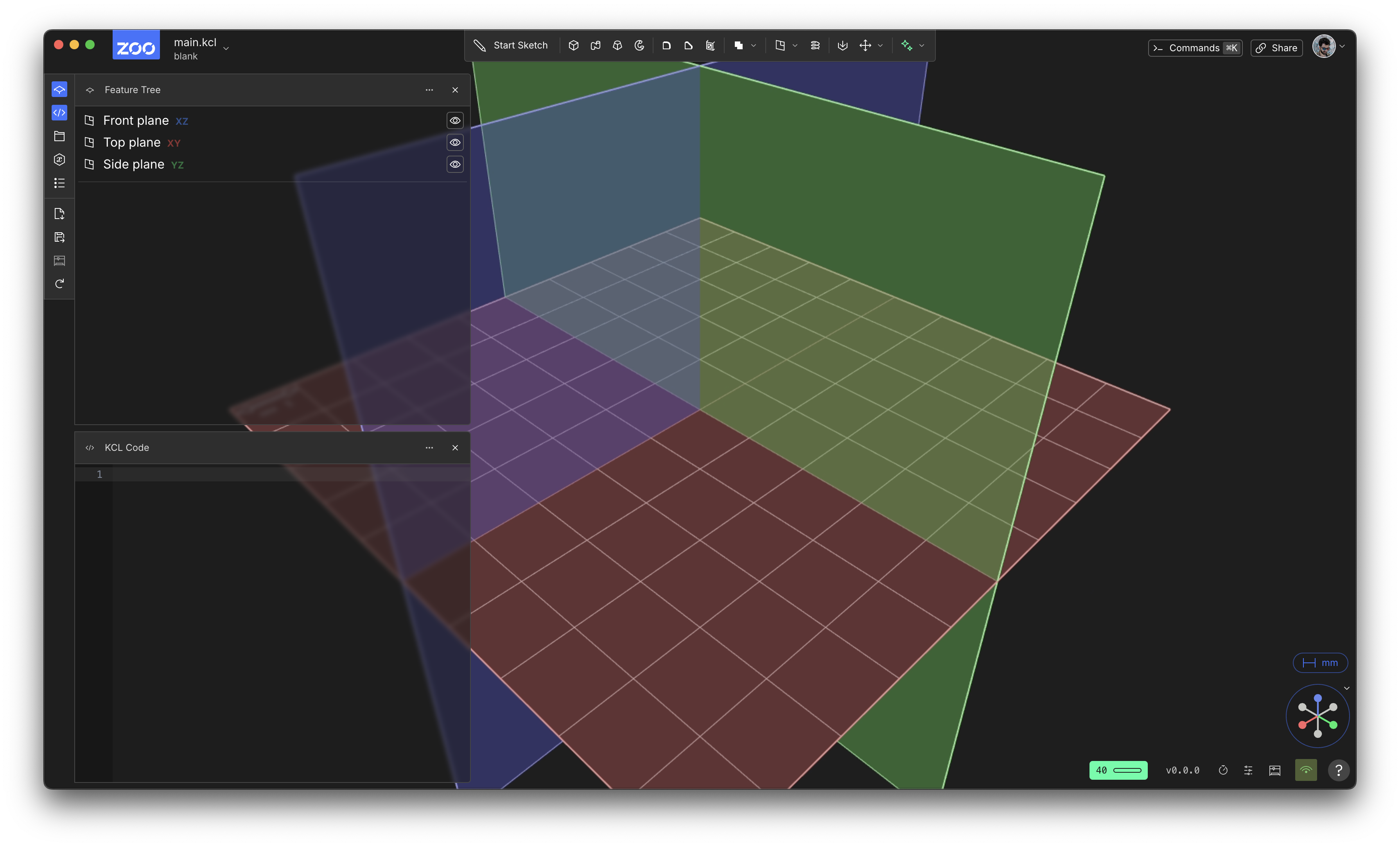
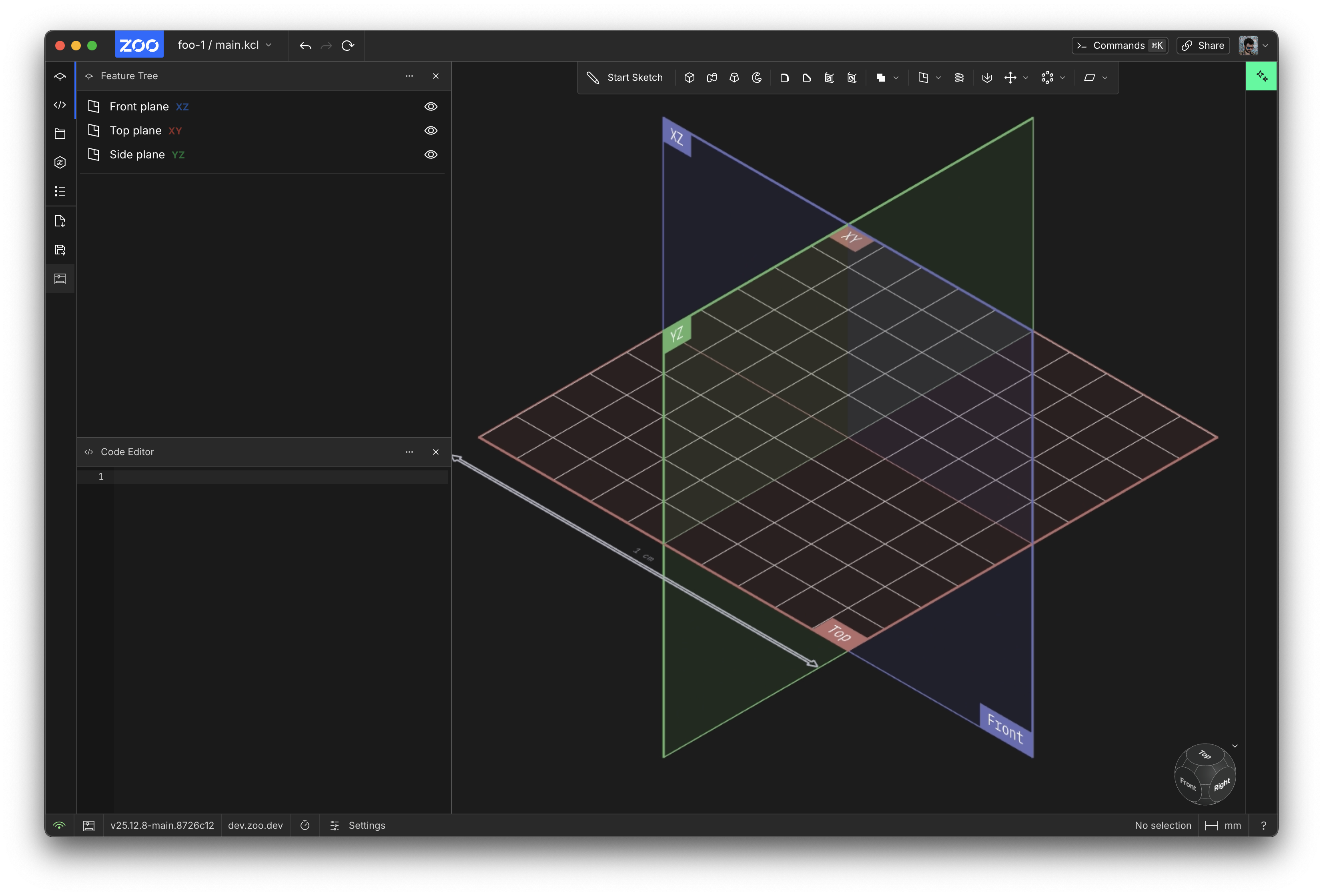
Firstly, the default planes look much better! They've got helpful labels now. Each plane is labelled with both a geometry-friendly name like XY, YZ and XZ, and also a human-friendly name like Top, Front and Side. These human-friendly names are also used in our brand-new orientation cube, in the bottom-right! The old orientation gizmo was a bit hard to use, and we think this cube is a massive improvement. Here's a little demo video.
Now you should find it much easier to understand what plane names like XY or YZ actually mean, when you can look at their new labels, and easily go to them via the cube.
Clone improvements
Previously, using the KCL clone() function would clone most of your object, but not the whole thing. Fillets, chamfers, new sketches you'd sketched on the solid's face -- none of these would be cloned too. You'd have to redo them. This was a major bug, but now it's fixed! When you call clone now, the entire shape you pass in should be cloned, including chamfers, fillets, other sketches, etc. Great job to our geometry engineer Serena fixing this! The same improvements have come through to 3D patterns too.
KCL argument autocomplete
Whether you write KCL in Zoo Design Studio or in some other editor, we recommend using our open-source LSP and Treesitter extensions for helpful features like syntax highlighting, auto-complete, code navigation etc.
This month we fixed a big problem KCL users have had. Consider a KCL function like circle. Previously our LSP would autocomplete identifiers you might want to assign to arguments, e.g. myRadius or circleCenter, but now it also suggests the arguments themselves, like radius or center.
Because KCL function calls require giving each argument's label, that's a lot of extra typing. Now autocomplete makes that extra typing mostly unnecessary. It was also hard to remember all the different arguments each KCL function supports (and we're adding more all the time!). Now you don't have to remember as many -- just start typing, and the autocomplete will tell you what the argument's label is, as well as show you its description.
Our LSP autocomplete was built a long time ago, back when KCL functions used positional arguments, not named arguments. Back then, a function like circle was called like circle([0, 0], 4) instead of circle(center = [0, 0], radius = 4). So our developer tools, like the LSP, were developed without considering argument labels. We're slowly improving our developer tools though, so keep checking back!
GD&T datum UI
We're adding more GD&T features to our point-and-click UI! This month we added a button for the "Datum" annotation. It's a drop-down in our general-purpose GD&T annotation menu, seen here:
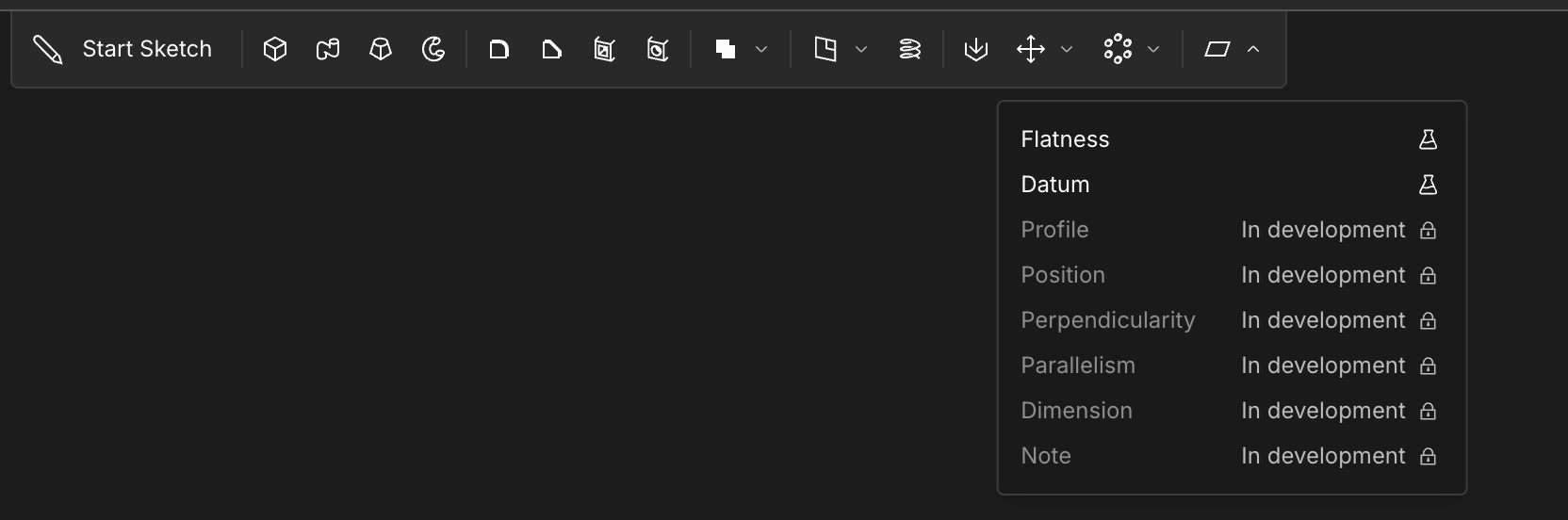
These tools are still experimental, and might change in the future, so you'll need to opt into experiments to enable them. We hope you find them helpful, please give us any feedback if you see anything that can be improved. You can learn more at the KCL docs.
Undo/redo buttons
We've always supported undo/redo via keyboard shortcuts, like Ctrl+Z, but now there's dedicated buttons in the UI for them!
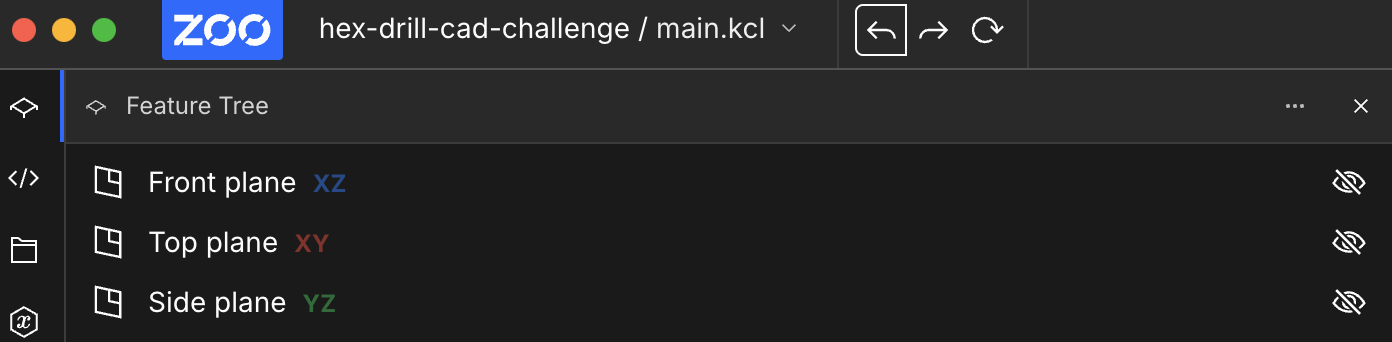
Like all our buttons, if you hover your cursor over it, it'll show you the keyboard shortcut for the button too, which hopefully helps users discover the keyboard shortcuts.
Large file exports
We didn't realize, but our server couldn't handle exported files of 16 megabytes or more. That's fixed now, thanks very much to our infrastructure engineer Adam Sunderland. Under the hood, we've switched from BSON to MessagePack, two similar ways to encode data in an efficient binary representation. The BSON crate we were using had a maximum filesize which was far smaller than what we needed. Enjoy exporting your large Zoo Design Studio projects!
More flexible parser
As always, we discovered some edge cases in our parser where KCL programs that should have been accepted, weren't. You can put comments in more places now, without breaking your code. We discovered these thanks to our Text-to-CAD system, which was generating KCL with perfectly reasonable-looking comments, only to find that they broke the program. We're really enjoying finding KCL bugs by watching the programs our Text-to-CAD generates. In an ideal world we'd never make bugs at all, but if we're going to have bugs, I'd rather Text-to-CAD find them before our users do. We can basically treat Text-to-CAD as a fuzzer, which has been very helpful.
New website
Our main homepage was redone this month. We've struggled to find the right balance between the traditional CAD side of Zoo (our point-and-click UI and desktop app) and the exciting new things we're building (like ML-assisted CAD). We think the new website strikes that balance better. Zoo lets you use a normal point-and-click CAD workflow, or code-driven CAD via KCL, or ML-driven CAD via Text-to-CAD. We think users should use whichever of these 3 methods is right for the job, and our website now reflects that.
Thanks for using Zoo! We hope these improvements made your projects a little bit easier. We're working on some very exciting improvements to our ML/Text-to-CAD integration, and I'm hopeful we'll be able to show it off soon. Have a great holiday season!